
|

|

The Serial Trigger has four states of operation.
1. Load and configure.
2. Idle and monitoring.
3. Active sending command.
4. Configuration.
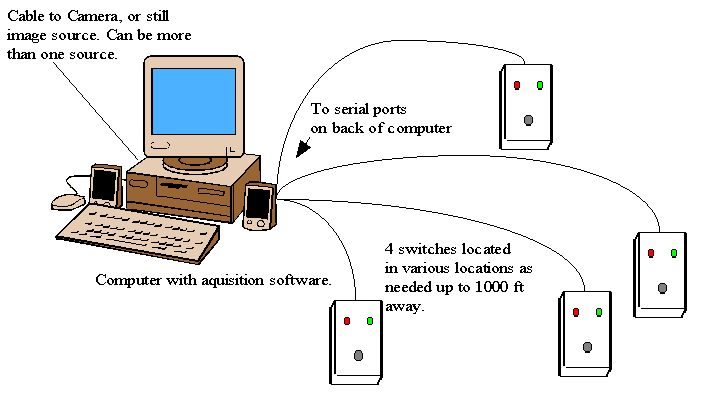
In the load and configure state the application loads the saved configuration stored on the hard drive, that was setup during the configuration of the software. At this point it initializes the switch devices and goes to idle. In the idle and monitoring state it will stand idle in the system tray taking up little or no resources from the computer. It monitors the serial port for an active state on the receive data pin. When this signal goes high the application will go into the active mode. In the Active mode it detects the program window that you want to control and sends the programmed keystrokes to that window. This will cause the window being controlled to execute those keyboard strokes. In imaging acquisition it allows you to execute the click able menu command to capture the image. In the configuration state, it allows the operator to configure the controlled window name, keyboard commands, and the serial ports to monitor. The system can handle up to four serial ports to monitor at one time. The system can also be upgraded to handle more ports if needed. Four is typical of most image capture boards. Features of the switch include a green ready LED and a red busy LED to instruct the operator when the system is ready to acquire and to wait when the system is busy acquiring. Below is a diagram of a typical application.
Serial Trigger Information
Application Overview
Screen Shots
Contact Us
|
|
|